Cinema 4D 2026 · Redshift & Octane · v0.5.63

Stop converting
materials by hand.

LOOM is the all-in-one material pipeline for Cinema 4D. Convert Octane to Redshift with full node graph fidelity. Scan textures. Organize scenes. 10 modules in one plugin.

Free tier available · 14-day full trial · No subscription · Fully undoable

LOOM Hub v3
$ loom scene_convert --target redshift
[+] Analyzing 24 Octane materials...
[+] Base Color, Roughness, Normal — preserved
[+] Mix layers, TriPlanar, Ramps — rebuilt
[+] 3 lights converted (Area, Dome + HDRI)
[+] 2 cameras converted (DOF, Bokeh)
=== Done: 24/24 materials, 0 errors 12.4s
// Ctrl+Z to undo. Yes, the whole thing.
C4D 2026 Redshift & Octane Windows & macOS 49,000+ lines 63 commands Fully Undoable

"I'll organize it later."

— You, 6 months ago. 247 objects, no hierarchy, no naming, 14 orphaned materials. LOOM fixes this in one click.

Octane to Redshift material converter.
Plus Legacy RS upgrader.

Convert Octane materials to Redshift with full node graph preservation — 28+ channels, Mix layers, TriPlanar, Ramps, Noise. Upgrade old RS Shader Graph materials to modern Node Materials. Nothing else does either.

28+
Material channels preserved
First ever
Oct→RS converter with node graphs
12s
Full scene convert
Ctrl+Z
Every operation undoable

The Hub. Everything in one place.

Modern HTML panel inside Cinema 4D. Dark theme, real-time status bar, 10 modules in one sidebar. Rich output — colored pills, health bars, clickable actions.
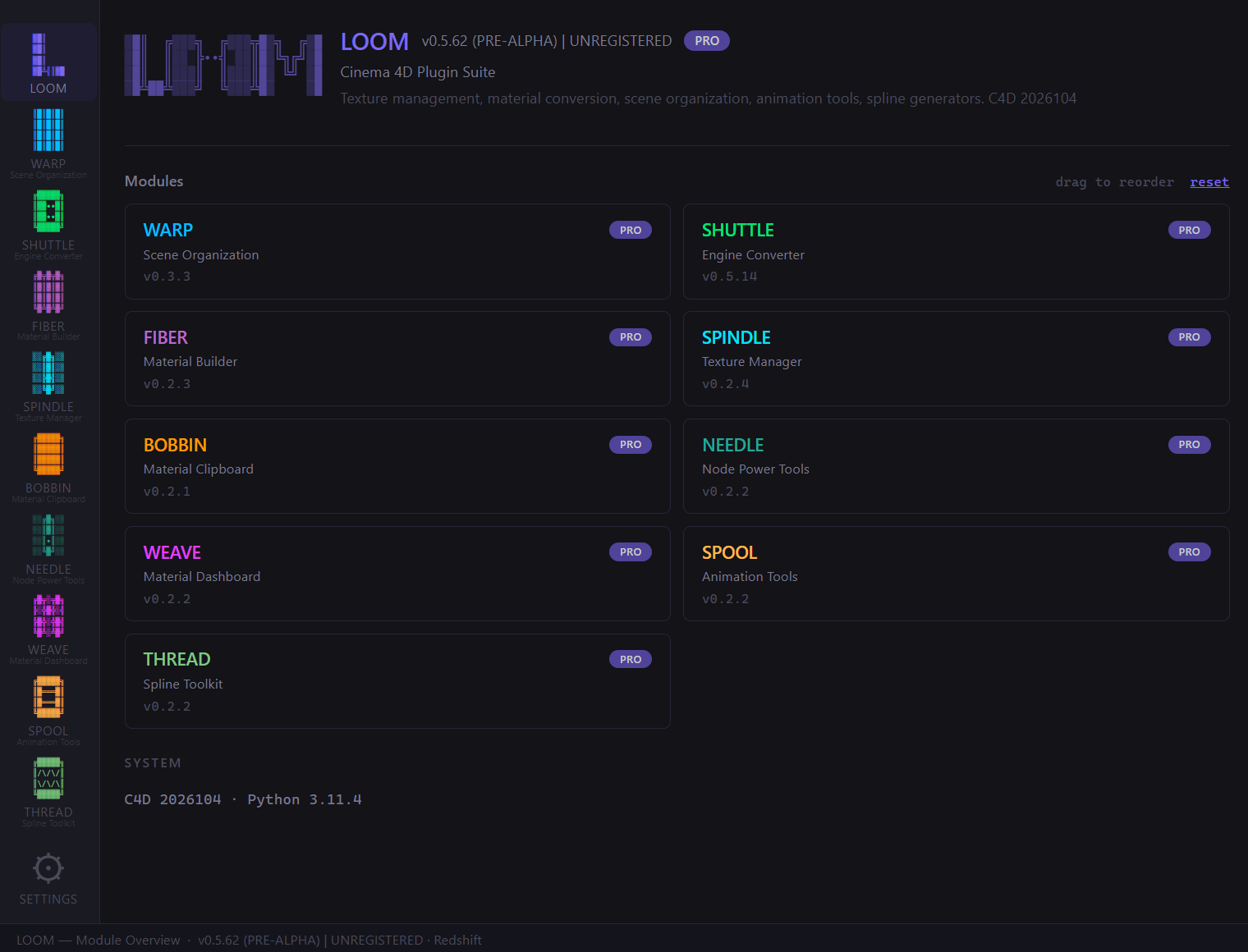
  • 10 modules, one sidebar
  • Drag-to-reorder module cards
  • Settings persist between sessions
  • Real-time: selected materials, active renderer
  • Rich HTML output (tables, pills, health bars)
  • Theme system (5 presets + custom color)
LOOM Hub

Everything between import and render.

SHUTTLE

v0.5.14
  • Octane → Redshift converter
  • Batch convert entire scene
  • Lights + Cameras + HDRI
  • Legacy RS material upgrader
  • Autocorrect
$59 Buy

WARP

v0.3.3
  • Organize Scene
  • Sanitize
  • Naming Conventions
  • Instance Check
  • 7 Mesh Repair Tools
$25Free Lite
Buy PRO

SPINDLE

v0.2.4
  • 9 Scene Health Checks
  • Auto-Fix All
  • Smart Relink
  • Collect Project
  • Consolidate to tex/
$29Free Lite
Buy PRO

FIBER

v0.2.3
  • Create from Folder
  • Batch Import
  • 10 PBR Channels
  • Auto-Colorspace
$25 Buy

WEAVE

v0.2.2
  • Batch Rename
  • Batch Edit Attributes
  • Organize Materials
  • Merge Duplicates
$25 Buy

NEEDLE

v0.2.2
  • Loomify (rename+layout)
  • Copy/Paste Graph
  • Node Cleanup
  • Presets Save/Load
$25 Buy

BOBBIN

v0.2.1
  • Copy Material
  • Smart Paste
  • Batch Replace
$19Free Lite
Buy PRO

SPOOL

v0.2.2
  • Import Sound
  • Apply / Copy / Paste Easing
  • Scale Curve
  • Clean Keys
$29 Buy

THREAD

v0.2.2
  • Chamfer Spline
  • Optimize Spline
  • Offset
  • Trim
  • Mesh from Spline
$29 Buy

LOOM vs. doing it yourself

TaskManualLOOM
Convert 20 materials2-4 hours of soul-crushing rebuild10 seconds. One click.
Find missing texturesOpen. Check. Scroll. Cry. Repeat.Scan. Relink. Done.
Organize 200+ objects30 min of drag & drop therapyOne click. Undo if you hate it.
Scene health checkHope and prayer9 checks + auto-fix
Import PBR texturesCreate mat, add nodes, connect, colorspace...Point at folder. Done.
Rename 50 materialsClick. Type. Click. Type. Question life.Pattern: Asset_*_# → done

"I automated my laziness so hard it became a product."

— The developer, mass amounts of coffee, 3 AM

Buy what you need. Bundle & save.

One-time purchase. No subscription. All v1.x updates free.

FREE
$0
forever
  • WARP Lite (Organize + Sanitize)
  • SPINDLE Lite (9 Scene Checks)
  • BOBBIN Lite (Copy/Paste)
  • No time limit, no registration
Download Free
COMPLETE
$149
one-time · all 10 modules
  • Everything in PRO
  • + SPOOL (animation)
  • + THREAD (splines)
  • 44% off vs individual
Get COMPLETE

Individual modules $19-59 · See full catalog →

Questions

How do I install LOOM?

Download ZIP, extract to C4D plugins folder, restart. Extensions → LOOM. No installer, no wizard.

Which C4D version?

Cinema 4D 2026 (Python 3.11). Windows and macOS.

Is the conversion lossless?

28+ channels, complex node graphs preserved. 95% of production materials convert identically. Edge cases are logged.

Can I undo everything?

Yes. Every operation. Convert 100 materials? Ctrl+Z. Done.

Do I need internet?

No. Fully offline after activation. No telemetry.

Updates?

All v1.x updates free. Download, replace folder, restart.

Refund?

30 days, no questions. But try the 14-day trial first.

Multiple machines?

1 license = up to 3 machines. Studio pricing on request.

"Behind every clean scene is a 3D artist who was one broken texture path away from quitting the industry."

Try LOOM free for 14 days.

Full access, no limits, no credit card.

Get LOOM
49,184
lines of Python
and counting
10
modules
each with its own personality disorder
1
developer
send help
~4,000
cups of coffee
conservative estimate
5
months of dev
felt like 5 days. wait, the other way
63
MCP commands
AI controls C4D. free on GitHub
28+
material channels
more than your ex has red flags
3 AM
average debug session
branch children are lazy. like the dev